
Magento 1 to Magento 2 Migration: Secure, Cost‑Effective Upgrade Strategy
Running Magento 1 today creates a clear technical and business liability: unsupported software increases your exposure to security, performance, and compliance failures, while modern platforms deliver measurable gains in speed and scale. This guide walks through what a Magento 1 → Magento 2 migration actually involves, why it’s urgent in 2025, the step‑by‑step migration workflow, how to estimate costs, and where to find real results that justify the investment. You’ll see how discovery and Magento 1 to Magento 2 data migration work, how themes and extensions are handled, what testing and go‑live tactics reduce downtime, and which post‑migration tasks protect ROI. We blend technical best practices (backups, schema mapping, performance tuning) with business priorities (conversion lift, lower maintenance) and give pragmatic checklists and clear decision criteria so you can plan a safe, efficient migration or evaluate managed services.
Why a Magento 1 → Magento 2 Migration Is Critical in 2025
By 2025, running unsupported Magento 1 amplifies risk: security gaps, compatibility drift with modern infrastructure, and the inability to take advantage of performance and UX improvements that drive conversions. Without vendor patches or current integrations, Magento 1 stores face higher chances of malware, data loss, and failed PCI audits—outcomes that hit the bottom line and reputation. Moving to Magento 2 brings a stronger security posture, better caching and performance, and an extension ecosystem that supports PWA and headless approaches—changes that typically raise conversions and lower operating cost. Below we break down the specific security risks and concrete benefits that make migration a near‑term planning priority.
Customer expectations and market standards—faster pages on mobile, richer commerce integrations and personalization—make migration more than a technical refresh. These trends help prioritize workstreams from data integrity to theme modernization and explain how security risks appear on legacy Magento 1 sites.
What Security Risks Come from Magento 1’s End of Life?

Magento 1 reached end‑of‑life in June 2020, so there are no official vendor patches for new vulnerabilities. That gap makes known and newly discovered exploits easier to weaponize, risking customer PII, payment data, and admin credentials. The business consequences include data breaches, failed PCI audits, downtime for incident recovery, and long‑term loss of customer trust. Short‑term mitigations—tight WAF rules or isolating the store—help but are stopgaps. Migrating to a supported platform with ongoing security updates is the reliable way to reduce exposure. These risks shape migration steps that prioritize data protection and a controlled cutover.
What Advantages Does Magento 2 Provide?
Magento 2’s modern architecture improves performance, security, and developer productivity—each of which affects customer experience and operating cost. Features like improved full‑page caching, native support for Varnish and Redis, and asynchronous indexing lower server load and speed up pages, which usually boosts conversions. A regular patch cadence and stronger security model reduce exploit risk. The admin UX is more efficient for merchandising and order handling, and Composer‑based dependency management simplifies upgrades and third‑party integrations, opening the door to PWA or headless storefronts. These advantages form the business case for migration and guide priorities like performance tuning and extension strategy.
With those benefits in mind, the next section outlines the practical migration steps, starting with a focused discovery and audit.
Key Steps in a Magento 1 → Magento 2 Migration
A repeatable, low‑risk migration follows a clear sequence: discovery and audit, data migration with the Magento 2 Data Migration Tool, theme and extension strategy, testing and optimization, and a controlled go‑live with post‑migration support. Each phase reduces risk by clarifying scope, validating data integrity, and confirming integration compatibility (payment gateways, ERPs, etc.). The summary table below gives stakeholders a quick view of phases and deliverables.
| Phase | Scope Items | Deliverables |
|---|---|---|
| Discovery & Audit | Product catalog, custom modules, extensions, integrations, SEO inventory | Audit report, migration plan, timeline, risk register |
| Data Migration | Customers, orders, products, media, attribute mapping | Migration scripts, mapping rules, verification reports |
| Theme & Extension Work | Theme compatibility, extension replacement, custom module refactor | Rebuilt theme or port, extension alternatives, integration adapters |
How Discovery and Audit Prepare Your Store
The discovery and audit phase establishes scope by inventorying products, customer records, orders, custom modules, third‑party extensions, and external integrations—providing the baseline for cost, timeline, and risk. Auditors capture SKU counts, attribute complexity, customer and order volumes, and highlight custom code that needs refactor or reimplementation on Magento 2. Deliverables typically include an extension compatibility matrix, a list of integrations that need API work, and an SEO inventory to preserve URLs and metadata. These outputs drive migration sequencing and help estimate downtime and testing effort, enabling realistic planning for Magento data migration, theme work, and regression testing.
How Data Is Migrated Securely with the Magento 2 Tool
Data migration uses the Magento 2 Data Migration Tool to map and transfer catalog, customer, and order data while preserving referential integrity and transaction history through staged and incremental syncs. Best practices include full database backups, repeated test migrations in staging, custom mapping for legacy attributes, and a final incremental (delta) sync just before cutover to minimize data loss. Validation—row counts, checksums, and order reconciliation—confirms integrity; transactional data is reconciled in the final migration window. Common pitfalls are mismatched custom attributes and large media volumes; addressing these during discovery reduces surprises. Careful staging and verification help ensure the new store works reliably in production.
How Themes and Extensions Are Upgraded or Rebuilt
Because Magento 2 uses a different frontend architecture and Composer‑based dependencies, themes and extensions often need rebuilds or replacements. Teams decide whether to port, rebuild, or replace based on business value, porting cost versus rebuild, performance impact, and availability of Magento 2‑compatible extensions. Many teams rebuild themes to adopt responsive, PWA‑ready patterns and performance best practices; extensions are usually swapped for maintained alternatives or custom developed when a direct port isn’t feasible. The typical workflow: compatibility mapping, prototyping the rebuilt theme in staging, then progressively replacing extensions while preserving feature parity. Those decisions directly affect timeline and cost.
What Testing and Optimization Are Required Before Go‑Live?
Testing and optimization cover functional QA, regression testing, performance benchmarking, security scans, and SEO checks to ensure the migrated site behaves like the live store and meets performance targets. Functional QA validates checkout, customer flows, promotions, and integrations; regression testing confirms custom features after refactor. Performance tuning targets full‑page cache, Varnish and Redis settings, and image/media delivery to hit target load times and TTFB. SEO validation verifies redirects, canonical tags, XML sitemaps, and structured data to preserve search equity. A rigorous test plan with clear acceptance criteria reduces post‑launch surprises and informs go‑live and rollback decisions.
How Downtime Is Managed and What Post‑Migration Support Looks Like
Downtime is minimized through incremental synchronization, staged cutovers, and tested rollback procedures that limit disruption during the final migration window. Incremental syncs shrink the delta between staging and production, allowing a short maintenance window for final switch‑over; DNS TTL planning and cache priming shorten perceived downtime. Rollback plans include database snapshots and deployment rollback scripts to restore the previous state if needed. Post‑migration support typically provides monitoring, hotfix triage, and scheduled optimizations to resolve early issues and stabilize operations. These operational controls are often part of managed services that deliver ongoing maintenance, security patching, and performance tuning after go‑live.
Next, we translate these technical steps into realistic cost expectations and ROI considerations.
How Much Does a Magento 1 → Magento 2 Migration Cost and What Drives Price?
Migration costs vary because they scale with catalog size, customizations, extension complexity, and integration scope—not a fixed fee. Major cost drivers include SKU count and attribute complexity, the depth of custom module refactor, whether themes are rebuilt or redesigned, and the complexity of external integrations like ERPs or custom payment systems. Other cost factors: data cleanup, QA and testing effort, hosting modernization, performance optimization, and SEO preservation. Instead of arbitrary price ranges, map each driver to its relative impact and request a scoped quote that reflects your store’s complexity.
| Cost Driver | Attribute | Example Impact |
|---|---|---|
| Product Catalog | SKU count & attribute complexity | High — large catalogs require longer migration and verification |
| Custom Code | Custom modules & bespoke workflows | High — refactor or rewrite increases developer hours |
| Theme Complexity | Custom UX, PWA, headless requirements | Medium–High — rebuilds add design and development time |
| Integrations | ERP, OMS, custom APIs | Medium — adapter development and end‑to‑end testing |
Use these drivers to prioritize scope during discovery and build a realistic budget. The sections that follow unpack specific factors and how migration typically delivers ROI.
Which Factors Most Affect Migration Cost?
Concrete factors that drive effort and cost include data volume (customers, orders, products), the amount of custom code to refactor, the number of third‑party integrations needing new connectors, and theme complexity or PWA ambitions. A small catalog with standard extensions typically moves faster than an enterprise catalog with custom pricing, tiered rules, and multiple integrations. Large media libraries and complex CDN setups add time. Each factor increases developer, QA, and project management hours, so transparent scoping in discovery is essential for accurate budgets and timelines.
How Migration Investment Can Deliver Measurable ROI
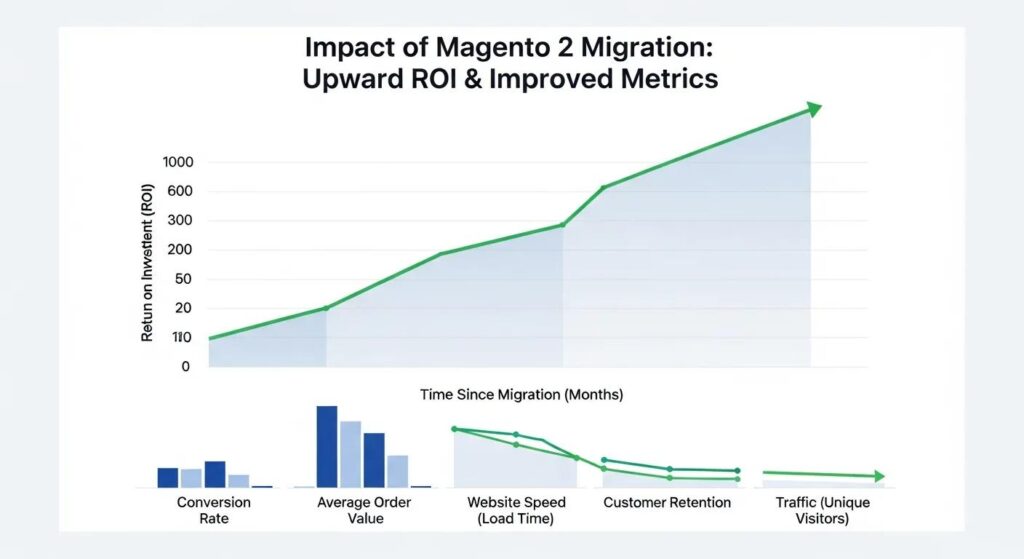
Migration typically pays back through faster page loads, better mobile UX, fewer security incidents, and lower long‑term maintenance costs—factors that raise conversion rates and average order value. Performance improvements (lower TTFB and faster rendering) commonly produce measurable conversion uplifts; a more efficient admin reduces operational overhead for merchandising and order processing. Less security exposure reduces breach risk and compliance costs, and a modern extension ecosystem enables personalization and marketing features that increase lifetime value. Framing migration as an investment in conversion and stability helps stakeholders prioritize features that deliver clear business outcomes.
For a tailored estimate, request a scoped migration audit from an experienced provider to map these drivers to a project budget and schedule.
How CyberSolutions LLC Delivers a Smooth, Secure Magento 2 Upgrade
CyberSolutions LLC offers end‑to‑end migration support focused on minimizing risk, protecting SEO, and enabling post‑launch optimization. Our approach combines a technical audit, structured migration using the Magento 2 Data Migration Tool, theme and extension rebuilds, and managed services for security and performance after go‑live. We treat migration as both a technical upgrade and a business continuity project—emphasizing staged testing, incremental syncs, and post‑launch monitoring to protect revenue. If you need help, CyberSolutions can run an audit and propose a migration plan that balances speed, cost, and risk, with managed services to safeguard the investment.
What Specialized Skills Does CyberSolutions Bring?
Our migration teams include Magento developers, data migration specialists, frontend engineers, QA analysts, and security practitioners who collaborate across the full migration lifecycle. Typical roles: auditors who map scope and risk, data engineers who design mapping and incremental syncs, frontend developers who rebuild themes to modern standards, QA engineers who validate functionality and performance, and security experts who harden the environment. This cross‑discipline coverage ensures each phase is owned and handoffs—from discovery to data work to go‑live—are smooth. Managed services provide continuity with monitoring and scheduled maintenance after launch.
How Managed Services and Post‑Migration Support Protect Your Store
Managed services extend the migration’s value by providing ongoing security updates, performance tuning, monitoring, and rapid incident response to prevent regressions. Typical services include patch management, malware monitoring and removal, vulnerability assessments, and performance audits to keep the storefront stable and secure. Ongoing SEO monitoring and URL checks preserve organic traffic, while optimization sprints unlock incremental conversion gains. By shifting routine maintenance to a managed provider, internal teams can focus on merchandising and growth while the service partner handles infrastructure and resilience.
If you’d like a professional migration audit and a managed service proposal scoped to your store, CyberSolutions can prepare next steps and a tailored plan.
Common Questions About Magento 1 → Magento 2 Migration
Stakeholders often ask about timelines, Magento 1 support status, and how the Magento 2 Data Migration Tool works. Clear, concise answers help set expectations and reduce project risk. The sections below provide practical ranges and guidance to help teams decide whether to schedule an audit and how to approach go‑live.
How Long Does a Typical Migration Take?
Timelines depend on scope. A small store with few customizations can finish in several weeks; medium complexity projects often take 8–16 weeks; enterprise migrations with many integrations and custom modules commonly run 4+ months. Key duration drivers: SKU count, custom modules to refactor, integrations to adapt, and QA effort. Build time for iterative testing and performance tuning into the schedule to avoid lengthy post‑launch fixes. magento development services
Is Magento 1 Still Supported and Safe to Use in 2025?
No—Magento 1 reached official end of life in June 2020. There are no vendor security patches or mainstream support, so continued use increases security and compliance risk. Running an unsupported platform in 2025 raises the chance of compromise, complicates PCI compliance, and makes new integrations harder. Organizations on Magento 1 should treat the environment as high risk and prioritize migration planning or interim mitigations (isolation, strict WAF, monitoring) while preparing a migration path to Magento 2 or another supported platform.
What Is the Magento 2 Data Migration Tool and How Does It Work?
The Magento 2 Data Migration Tool is an official Adobe utility that maps and migrates database entities from Magento 1 to Magento 2—transferring customers, orders, and product data while mapping schema differences. It supports staged and incremental syncs to reduce production downtime. Best practices: run test migrations in staging, customize mapping for legacy attributes, validate data integrity after each run, and perform a final delta migration immediately before cutover. Proper use of the tool is central to preserving transactional history and ensuring a reliable migration.
Next we show real examples of what successful migrations look like and the measurable results they deliver.
Real‑World Examples of Successful Migrations
Case examples help decision‑makers visualize outcomes and quantify benefits such as load‑time reductions, conversion uplifts, and lower maintenance overhead. The table below summarizes anonymized client scenarios, core challenges, our approach, and measurable results to illustrate common impact patterns. These sketches show how technical fixes translate to business outcomes and underscore the need for post‑migration optimization.
| Client Type | Challenge | Solution | Results |
|---|---|---|---|
| Mid‑market retailer | Large SKU count and legacy extensions | Audit, phased data migration, theme rebuild | Faster page loads, improved checkout conversion |
| B2B wholesaler | Complex pricing rules & ERP integration | Custom adapter, staged cutover, verification | Fewer order errors and faster order processing |
| Direct‑to‑consumer brand | Poor mobile performance | PWA storefront rebuild and caching optimization | Lower bounce rates and higher mobile conversions |
These examples follow a pattern: diagnose the bottleneck, apply targeted technical fixes, and measure post‑migration KPIs to validate ROI. The sections below describe common challenges and typical measurable outcomes.
What Challenges Are Usually Overcome?
Frequent obstacles include legacy custom modules incompatible with Magento 2, very large catalogs that require staged migration, and complex integrations that need custom adapters. Teams typically refactor or replace custom code, perform incremental syncs and parallel validation for large catalogs, and adapt integrations with API connectors tested end‑to‑end. Media assets and SEO need careful handling—redirects, canonical tags, and sitemaps—to preserve traffic. Using these repeatable remedies reduces downtime and revenue risk during migration.
What Measurable Results Do Clients See?
Post‑migration improvements often include shorter page load times, higher conversion rates, fewer security incidents, and lower maintenance costs. Performance work—full‑page caching, image delivery, CDN tuning—can shave multiple seconds from load times and lift conversions by measurable percentages. Security hardening and regular updates lower incident rates and remediation costs; cleaner architectures reduce ongoing developer hours. These measurable outcomes support migration as an investment in stability and growth.
- Audit readiness: Start with an audit to map scope and risk.
- Data integrity: Use the Magento 2 Data Migration Tool with staged verification.
- Theme and extensions: Choose rebuild vs replace based on UX and cost.
- Testing and go‑live: Plan incremental syncs, rollback, and monitoring.
- Managed care: Maintain post‑launch managed services to protect ROI.
Frequently Asked Questions
What are the main differences between Magento 1 and Magento 2?
Magento 2 uses a modern architecture that improves performance, security, and usability versus Magento 1. Key differences: better full‑page caching, stronger mobile support, and a more intuitive admin. Magento 2 also enables Progressive Web Apps (PWA) and headless setups not available in Magento 1. These enhancements deliver faster pages, higher conversion potential, and a healthier extension ecosystem—making Magento 2 the better choice for growing e‑commerce sites.
How can businesses prepare for the Magento 2 data migration process?
Preparation starts with a thorough audit of your Magento 1 store to list products, customers, orders, and custom modules. Build a detailed migration plan that defines scope, timeline, and risks. Back up your data and familiarize the team with the Magento 2 environment. Engaging experienced migration specialists can streamline the process and reduce risk.
What role does SEO play in the Magento migration process?
SEO is critical to preserve rankings and traffic. Create an SEO inventory of URL structures, metadata, and canonical tags; plan 301 redirects for changed URLs and keep the content hierarchy consistent where possible. Run post‑migration SEO audits to verify elements and spot issues quickly so organic traffic is not lost during the transition.
What are the common pitfalls to avoid during migration?
Common mistakes: poor planning, underestimating custom module complexity, and skipping data integrity checks. Insufficient testing can cause post‑launch functionality issues, and ignoring SEO can cost traffic. Have a clear migration strategy and a rollback plan to handle unexpected problems.
How can businesses ensure a smooth go‑live transition?
Use a staged cutover with incremental data syncs and thorough testing to minimize downtime and validate data in real time. Prepare rollback steps in case of critical failures, and ensure a dedicated support team is on standby during go‑live to address issues quickly and keep the new store stable.
What ongoing maintenance is required after migrating to Magento 2?
Ongoing maintenance is essential: regular Magento updates, security monitoring and patching, and performance tuning (caching, queries, CDN). Periodic SEO audits and optimization sprints keep visibility and conversion performance on track. Many teams outsource routine maintenance to a managed service so internal staff can focus on growth.
Conclusion
Migrating from Magento 1 to Magento 2 is a necessary step to improve security, speed, and user experience—and to protect and grow revenue. A structured migration preserves data integrity and SEO value while enabling modern features that lower long‑term costs. For a migration plan tailored to your store, contact our team for an audit and a scoped proposal that balances speed, risk, and budget.